2009/04/23

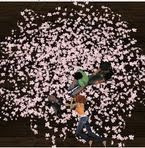
sakura (cherryblossom) candle

sakura flower candle 1prim FREE for you


when clicked scatters pretty flowers around!

タッチすれば桜の花びらを撒き散らし


with sit animation.
SITすれば座るアニメがでます。


桜キャンドル0L$

N326お店はHERE

2009/03/15

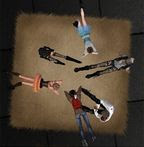
"sakura" carpet

For Spring carpet "sakura"
1 prim ,modify,copy or trans (trans 99 L$)


click to have the carpet animate you and your friends
in a variety of poses which saves on those costly prims for poseball furniture!
メニューから何人でも好きな場所でリラックスできます。


18 animations (sitting or laying on the carpet, click on it.)
Replacement animations OK.
if you want to stop animation,chose STOP from menu.


柄テクスチャもアニメも22個まで追加可能(コンテンツに入れるだけ)
アニメは新しいのを追加して18入り。
入れ替えも追加も自由にできるよ。(コンテンツに入れるだけ。22個まで)


*床が凸凹してるならファントムを外すといいかもです。
*背が低い人高い人は、直接SITしてmenuからアニメを選んでね。
 アニメの名前,<座標>,<回転>をノートで調整できます。

みんなでリラックスしよう♪


DEMOがあります。見に来て触ってみてね。
Shop N326 HERE

2009/03/14

Grow up Cactus

The cactus talks when clicked, it's lots of fun as it also
scatters pretty flowers around! (日本語は下にあります)


You can change GrowUp ON/OFF,SayMes ON/OFF,Transform,Pot teature on the pot by menu.clicking it (click and hold it down for 4 seconds);

To put in your own sentences, please add them to the Message notecard
found within the cactus (right click and go to Contents tab).
It says the words written and added there sequentially.

After change message,have a menu and push Reload note batton.
(click and hotd cactus down for 4 seconds)

You can change the textures on the pot by menu.clicking it (click and hold it down for 4 seconds);
a dropdown menu will give you options.

can sit on cactus has 1 animation


日々成長するさぼてんです。
クリックするたびに、ノートカードに書いた言葉を言いながら
花を撒き散らします。(花は1分で消えます)

Menuさぼてん長押し(4秒位)でmenuがでます。

Transformを押すと成長させます。
SayMesは、ノートカードの内容をしゃべるONとOFFです。
GrowUpは、成長をさせるかさせないかONとOFFです。
Reload noteは、ノートカード内容変更後に押してください。
Pot textureは、鉢の柄がえです。

サボテンにSITするとアニメが発動します。

しゃべる内容はコンテンツ内のmessageノートカードで変更してください。
100行試しましたw

ご質問などございましたらご連絡ください。mame Anthony

2009/01/20

N326 slide show

Give LM,show your website  
LMを渡したりホームページに飛んだりできます

how to use Slide show (日本語は下にあります)
left click frame for change frame texture.
left click picture for menu.


Click pictures for set how to move it.
Click frame for change textures.(you can add your own textures)

HOW TO ADD IN YOUR OWN IMAGES:

- Right click the object.
- Drag your images/textures into the contents tab.

chose inside flame from menu.
menuから写真に古い感じや花柄のエフェクトかけられます


you can change size,textures.
1.click for a menu of options. Please set how to move it.
Start (Moves in choice the order.
Random (The choice order is shuffled and it.
*Zoom (Zooming
*L-R(Left & Right
*Scroll(Moves sideways
*Rot (Rotation


2.LM

- Right click the object.
- Delete LM "N326" from the contents tab.
- Drag your LM into the contents tab.

3.write website address inside notecard "WEBURL"


**オーナーさんのできること**

■写真たての周り(額部分)をタッチすると柄が変わります。

■写真たて内側(写真部分)をタッチをするとメニューが出ます。

~メニュー~

Normal/写真エフェクトなし
LM / コンテンツに入っているLMを渡す事ができます。
Website / コンテンツ中のノートカードWEBURLのアドレスを表示します。
Dust,Dirt,Retoro,Retoro2,Flower,Flower2 /写真エフェクト
Setup / スライドショーの流れ方を設定します。
Stop / スライドショーを止めます。
Start / 初期設定でスタートします。


**オーナー以外の人ができること**
LMとWebsiteのボタンが出ます。
オーナーが設定したLMを渡したり、
ノートカードで設定したWebsiteを見てもらうことができます。

スライドショー
*額縁をクリックで柄をかえられます。(texture追加可能です)

編集可能なので、好きなTEXTUREや色に染めたり
大きさを変更できます。

写真をクリックするとメニューがでます。
SET UPボタンから時間や動かし方を選んでください。


コンテンツの中に表示させたいtextureやLMを入れてください。


1.オブジェを右クリックして
編集を選んでください。

2.コンテンツの中にある
不要なTEXTUREを削除して
表示したいTEXTUREを入れてください。

3.コンテンツの中にLMを入れてください。

4.コンテンツの中にあるノートカード WEBURLを開いて
ホームページアドレスを書いてください。
 

不要の部品は、編集モードのリンク部位で選択して
Ctrl+shift+Lを押して解除後、削除してください。


ご質問などございましたらご連絡ください。

2008/12/14

Find easy potision setting

N326 carpet "IN and OUT"
you can add your object.( must be copy )
need to write notecard(.OBJECT)

買った商品や作った物を
カーペットから取り出せるよ♪(copy 商品じゃないと消したらゴミ箱行きです)
ノートカードに入れ出ししたい商品名と場所の数値を書きます。(notecard.OBJECT)

++++++++++++++++++++++++++++++++

Here is a Find Easy positon.(sitting position,object position)

ものづくりの苦手な人でも
編集不可能のオブジェでも簡単に設定可能!
ノートに書く数値を教えてくれる方法をお知らせします。

(5人までの直接座りたい位置や物の場所の数値を簡単に教えてくれます)
++++++++++++++++++++++++++++++++
inside carpet has a object **REZ script
take it out and move sctipt to your inventry.
カーペットの中に**REZ script箱があるので取り出して
中にあるスクリプトを持ち物の中に移動しておいてください。


++++++++++++++++++++++++++++++++
GET UUID cord of carpet  カーペットのUUIDコードが必要です

REZ a carpet.
then tell you carpet UUID cord at local chat.

カーペットの上でも外でもOK.カーペットをレズしてください。
レズする度に、UUIDコードをローカルチャットで教えてくれます。

↓this is UUID


also,when you push lord button,carpet tell you UUID.
メニューのlordボタンを押してもUUIDコードを教えてくれます


++++++++++++++++++++++++++++++++

1.Rez your object anywhere you want to.
1.カーペットから出し入れさせたいオブジェを置く。


If the object is not modify,make object and move to same place as the object.
change object name as a object you want to put in the carpet.
もし商品が編集不可能の場合は、自分で作ったオブジェを置いてください。
オブジェの名前を、出し入れしたいオブジェと同じ名前をつけてください。


3.Put Script (N326_say_object_pos)into the object
スクリプトN326_say_object_posをオブジェの中に入れてください。


4.When you put script into the object,ask you UUID cord.
SAY carpet UUID cord at local chat.

SAYスクリプトをオブジェに入れるとUUID教えてくださいと聞かれるので
ローカルチャットでUUIDを発言します。


5.then,object tell you object name and position of the object.
copy it and past to notecard ".OBJECT"

すると、ローカルチャットでオブジェ名と数値を言いますので
それをコピーして、ノートカードにはりつけてください。


↓notecard.OBJECT ノートカードにはりつけます(書き換え、追加OK)

object name,
オブジェの名前,<数値>


(座る位置もオブジェで確認できます。ノートカード*config)
アニメの名前,<座標>,<回転>を変更してください。

6.Put object (which you want to IN&OUT from the carpet) into carpet.
Push Lord button,wait seconds,and check your object name is in the menu"REZ"

出し入れしたいオブジェをカーペットの中に入れて
カーペットのメニューからlordボタンを押して
読み込みが終わりましたらメニューのREZボタンに商品名があるか出てくるか確認してください。


If the object is modify,put script"cleanup.module" into the object.
you can use CleanUp button.
オブジェが編集可能の場合、"cleanup.module"というスクリプトを入れてください。
メニューのCleanUpボタンでオブジェを消すことができます。


Any question about carpet,IM mame Anthony.
ご質問などございましたらお気軽にmame Anthony までIMください。

2008/12/04

Christmas candle (Free)


ckick a candle for on / off


Shop N326 here

N326 candle


1 prim candle.

Click your candle for a menu of options.
You can resize the candle, change the texture,
even add your own textures;
switch the flame on or off;
put a text message above the candle using either chat commands or a notecard
and you can click to have the candle animate you and your friends in a variety of poses which saves on those costly prims for poseball furniture!


MENU : Click a candle
キャンドルをクリックするとメニューがでます。


-Chat Rec/records 周辺チャット記録&表示

words from local chat to appear over the candle.
If you do NOT want any text over the candle...
Click wick again until it says "ready for listen"
and just type in screen two forward slashes // or space that's all


-Anime/can use more than 10 people together. どこでも誰でもアニメ
add or Replacement animations.
Drag your animations or poses into the contents tab.

-Anime Stop/if you want to stop animation,chose Anime STOP from menu.


-Mes on off/type in notecard*message what you want to appear over the candle.
ノートカードに書いたメッセージのONとOFF


-Texture/add or replace textures. ろうそくの柄がえ(追加可能)
Drag your texture into the contents tab.


-Reset/Chat Rec text reset button.

-Fire on off/The text synchronizes with displayed flame.炎のONとOFF

-Size/change candle size.


-Load/after add or replace animations and textures, select Load.

add own color in edit mode

Shop N326  お店はココ

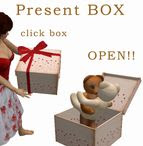
present BOX

Click on the lid to open and close the box.


Right click on the box and choose "wear" (attaches to left hand).
Click on the lid to open and close the box.

BOXは装着して使用してください。

BOXのふたをクリックすると
ふたの開け閉めができます。

箱は編集可能になっています。
リンク部位を編集で、柄や大きさをかえて
オリジナルを作ってみてください。

scatters pretty flowers around!


Right click on the box and choose "wear" (attaches to left hand).
Click on the lid to open and close the box.

when clicked heart inside box, it also
scatters pretty flowers around!

***** If you want to give a trans only item, you will have to tell the person you are giving the box to that they will need to look in the contents of the box and manually retrieve the item. *****

BOXは装着して使用してください。

BOXのふたをクリックすると
ふたの開け閉めができます。

BOX中のハートをclickすると
花を撒き散らします。

トランス可能の物であれば
箱のコンテンツ中にいれてプレゼントできます。

箱は編集可能になっています。
リンク部位を編集で、柄や大きさをかえて
オリジナルを作ってみてください。

WE HAVE DEMO
SHOP N326 HERE